
PureVPN Mac VPN Software7.2.2 - Download
You'll be able to download in few seconds.
Publisher Description
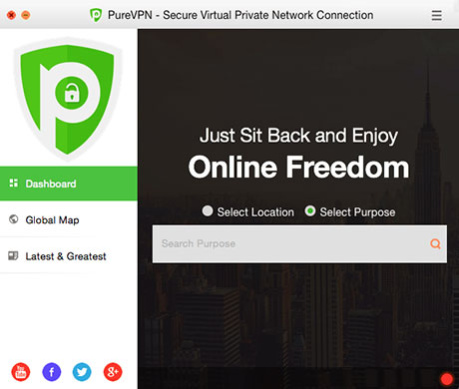
PureVPN, the industrys best VPN service offers state-of-the-art encryption, complete anonymity and dozens of features. PureVPNs VPN client for Mac offers premium encryption to enhance your online privacy and security.
Recent changes:
- Integration of Stealth VPN protocol
- New protocol: IPsec
- OSX Sierra compatibility
- Improved UI
- Connect/Disconnect directly from status bar
- Logout functionality
- Now features a new and far effective support system
Multilingual
PureVPN's VPN app for Mac has gone multilingual. Users can now use PureVPNs Mac VPN client in English, German, Dutch, Spanish, Chinese, Arabic, Turkish, and French languages and enjoy the best VPN service.
Auto-Reconnect Option
PureVPNs best VPN services' Mac VPN app comes with auto-reconnect feature which quickly reconnects the client if the VPN connection drops. This keeps PureVPN users secure at all times.
Improved UI
The updated UI for best VPN for Mac allows users to connect/disconnect via status bar menu and navigate to modes via dashboard. UI of the app's settings have also been updated and improved.
Purpose Selection
The best VPN Mac client helps users select the best settings via a single click for a particular purpose. For example, if a user wants to un-throttle their bandwidth while staying secure on the internet, they simply have to choose I want to stream and the best VPN service will instantly connect with the most suitable configuration.
Wi-Fi Security
Users are neither safe on private, nor on public Wi-Fi. This is why PureVPNs best VPN services' Mac VPN client encrypts all user data to secure their privacy and data, allowing them to be safe on all wireless connections.
Optimized for OS X Sierra
The Mac VPN client also supports OS X Sierra. PureVPNs Mac client has been optimized to work with all Mac versions including v.10.12x, allowing users to enjoy the best VPN service.
About PureVPN Mac VPN Software
This Encryption Tools program is available in English, Arabic, Chinese, Dutch, French, German, Spanish, Turkish. It was last updated on 29 September, 2026. PureVPN Mac VPN Software is compatible with the following operating systems: Mac.
The company that develops PureVPN Mac VPN Software is GZ Systems Ltd.. The latest version released by its developer is 7.2.2.
The download we have available for PureVPN Mac VPN Software has a file size of 24.1 MB. Just click the green Download button above to start the downloading process. The program is listed on our website since 2020-04-23 and was downloaded 0 times. We have already checked if the download link is safe, however for your own protection we recommend that you scan the downloaded software with your antivirus. Your antivirus may detect the PureVPN Mac VPN Software as malware if the download link is broken.
How to install PureVPN Mac VPN Software on your Windows device:
- Click on the Download button on our website. This will start the download from the website of the developer.
- Once the PureVPN Mac VPN Software is downloaded click on it to start the setup process (assuming you are on a desktop computer).
- When the installation is finished you should be able to see and run the program.
Program Details
General
System requirements
Download information
Pricing
Version History
version 7.2.2
posted on 2020-04-23
You don't have to remember difficult usernames like purevpn0s, purevpn0d, etc. anymore! Simply use your email address & password to login to PureVPN apps and extensions.
version 7.2.1
posted on 2019-12-19
Fixed identified issues, resolved bugs, optimized functionality.
version 7.2.0
posted on 2019-10-30
We went underneath the Mac app to fix identified issues, resolve bugs, optimize functionality and declutter things you dont want. Why? So, you can enjoy smoother and faster VPN on your Mac.
version 7.1.0.0
posted on 2019-06-24
The IP address is displayed again at the connected screen of our Mac app.
version 7.0.0
posted on 2018-11-15
Introduced OVPN protocols:
Added OpenVPN protocols for better connectivity
Improved User Experience:
Improved Internet Kill Switch UX based on your valuable feedback
Improved User Interface:
Tweaked the user interface for better visibility
Minor Bug Fixes
version 6.2.0
posted on 2018-09-06
We have added automatic protocol selection for a steady/speedy VPN connection.
We’ve streamlined the user feedback process.
Removed cities from streaming mode and added Port Forwarding screen under settings.
Introduced Ozone, Gravity, Port-forwarding, Dedicated IP and P2P protection as Add-ons.
version 6.0.3
posted on 2018-06-05
Improved UI
Introduced a sharper, cleaner interface to improve your user experience and keep it prim and up to the mark.
Issues Fixed
Fixed a few nasty bugs to ensure your app experience remains pure & clean.
version 6.0.1
posted on 2018-01-29
1- Integration of Stealth VPN protocol
2- New protocol: IPsec
3- OSX Sierra compatibility
4- Improved UI
5- Connect/Disconnect directly from status bar
6- Logout functionality
7- Now features a new and far effective support system
version 1.98
posted on 2014-08-14
- Country Flags UI Bug is fixed.
- Added City and Country to Server Selection.
- Server Sorting option is added.
- Fixed bug which caused protocol to not switch from PPTP.
- Cleaned up and made more robust the code responsible for creating VPN connection entry in the Networking panel
Disclaimer
External Download
We do not host PureVPN Mac VPN Software on our servers. We did not scan it for viruses, adware, spyware or other type of malware. This app is hosted by the software publisher and passed their terms and conditions to be listed there. We recommend caution when installing it.
The external download link for PureVPN Mac VPN Software is provided to you by apps112.com without any warranties, representations or guarantees of any kind, so access it at your own risk.
If you have questions regarding this particular app contact the publisher directly. For questions about the functionalities of apps112.com contact us.
